Gardening rewards good timing and a decent memory. Sow too early and frost takes the seedlings; forget when you last fed the tomatoes and you are guessing for the rest of the season. A good gardening app fixes both problems, quietly, from your pocket.
We tried the apps that actually get used week to week, not the ones that look impressive for a day and then sit unopened. Here are the best gardening apps in 2026, what each one is genuinely good at, and who should skip it.
What separates a great gardening app from a pretty one
- It knows where you garden. Advice tied to your climate and frost dates beats generic tips every time.
- It remembers for you. Watering, feeding, pruning, what you planted and when it went in the ground.
- It answers "what now?" The best apps tell you what to plant or do this week without you having to go looking.
- It is quick. If logging a task takes more than a few taps, you will stop doing it by June.
1. PlantHelper by GardenVive - best all-round gardening companion
Full disclosure: PlantHelper is our own app, so take our enthusiasm with a pinch of compost. Here is exactly what it does, so you can judge for yourself.
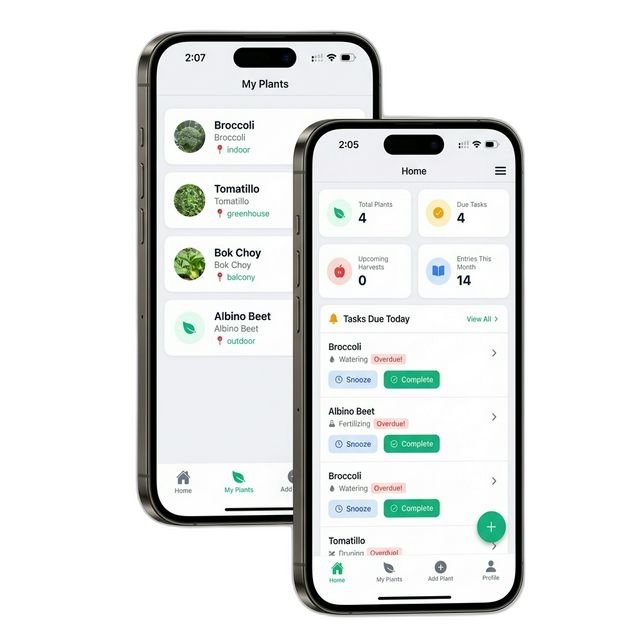
PlantHelper is built around the four things gardeners actually do all season: keep plants alive, write things down, decide what to plant next, and dream about what to grow later.
Plant tracking
Add every plant in your garden and PlantHelper keeps its own record of it: when it was planted, what care it needs, and what is due next. Watering and fertilizing reminders arrive when they are relevant, and each plant carries its own care history so you can see at a glance whether the peppers were fed last week or three weeks ago. It is the difference between managing a garden and remembering one.
Plant journal
Every plant gets a journal - notes and photos, dated, kept in one place. Log the first true leaves, the day the aphids showed up, the spray you used, the harvest weight. A season later the journal is the most valuable thing in the app: it tells you what worked in your beds rather than what worked in a general guide. Photos stacked over time make growth problems and recovery obvious in a way memory never does.
What to plant
The most-used screen in the app. PlantHelper looks at your location, your local climate and current weather conditions and tells you what can go in the ground right now - seeds to start indoors, seedlings to transplant, crops to direct sow. Tips are personalized to your climate and to the plants already growing in your garden, so the advice gets sharper as your garden fills up.
Wishlist
You read about a variety in January and it is gone from your head by March. The wishlist holds every plant you want to grow, and rather than sitting there as a static list, it notifies you when the ideal planting window for that plant arrives in your area. Nothing gets missed by a fortnight, which is usually how planting windows are missed.
Alongside those four, PlantHelper includes plant identification, plant health diagnosis, a hardiness zone finder, planting calendars and weather-based recommendations. The free tier covers a small garden; the premium tier lifts the plant limit substantially for people growing at scale.
Get it: App Store | Google Play
2. ZoneSprout - US Garden Planner - best for precise US planting dates and bed layouts
ZoneSprout is built for one job and does it with unusual rigour: telling gardeners in the United States exactly when to plant, and helping them lay out where everything goes.
Most apps stop at your USDA hardiness zone. ZoneSprout calculates dates using your state and your zone together, drawing on 20-year frost date averages, 30-year summer heat patterns, winter chill requirements, chill hours and plant maturity timelines - all worked out from weather records rather than rules of thumb. If you have ever wondered why a zone 7 planting chart felt wrong for your particular corner of zone 7, this is the app that fixes it.
What you get:
- Planting charts for 2700+ plants, covering seed starting, transplanting, direct sowing, blooming and harvest timing.
- A customizable garden bed planner that supports a range of bed shapes and dimensions, so the plan matches the beds you actually have.
- Seed tray planning for 72-cell and 50-cell trays - genuinely useful in February when you are trying to fit everything under the lights.
- "What to Do This Week", which prioritizes the handful of tasks that matter right now.
- A native plant database verified against USDA records and filterable by pollinator type.
- A gardening journal with photo documentation.
ZoneSprout is free to download, with a ZoneSprout Pro subscription at $7.99 per month or $79.99 per year. It runs on iPhone and iPad (iOS 15.1+), Mac (M1 or later) and Apple Vision. One caveat, stated plainly by the developer: it is built for the United States only. If you garden elsewhere, the date engine will not serve you.
Get it: ZoneSprout on the App Store
3. Planta - best for houseplants
If most of your green things live indoors, Planta is the app to beat. You tell it the room, the light and the pot, and it builds a care schedule around those conditions instead of a generic weekly reminder. Its light meter and repotting guidance are the standouts, and the interface is pleasant enough that people actually keep logging. The free version is usable; most of the clever features sit behind a subscription.
4. From Seed to Spoon - best free vegetable garden planner
A food-growing app with a strong philosophy: plant what your climate supports, and know what each crop does for you. It maps planting windows to your location, flags companion planting relationships and pest problems, and covers a wide vegetable and herb range without asking for money up front. The design is busier than most, but the information density is the point.
5. PictureThis - best plant identification
Point the camera, get a name. Identification apps have converged in quality, but PictureThis remains reliably fast and accurate on ornamentals, weeds and common problems, and it will take a stab at diagnosing a sick leaf. Worth having installed even if another app runs your garden - identification is the one task you want a specialist for.
6. GrowVeg Garden Planner - best for serious bed design
The drag-and-drop planner that experienced vegetable growers keep coming back to. Draw your beds, drop in crops, and it handles spacing, succession planting and crop rotation across seasons - it will warn you when this year's brassicas are landing where last year's brassicas grew. It is a paid subscription with no meaningful free tier, which is either a dealbreaker or a fair price for the only tool that plans multiple years properly.
7. iNaturalist (and Seek) - best for identifying everything else
Not a garden manager at all, but indispensable when you want to know what the insect on your squash leaf is. iNaturalist puts your observation in front of a community of naturalists; Seek, its child-friendly sibling, identifies on-device with no account. Both are free, and both will change how you look at your own garden.
8. Gardenize - best pure garden journal
If you want a record and nothing else, Gardenize is a clean, unopinionated diary for plants, areas and events, with photos and notes attached to each. No advice, no nudging - just a well-organized place to put what happened. Good for gardeners who already know what they are doing and simply want to remember it.
How to choose
- You want one app to run the whole garden: PlantHelper.
- You garden in the US and want the dates to be exactly right: ZoneSprout.
- Your plants are indoors: Planta.
- You are growing food on a budget: From Seed to Spoon.
- You mostly need to identify things: PictureThis, or iNaturalist for wildlife.
- You design beds years in advance: GrowVeg Garden Planner.
- You just want a diary: Gardenize.
Most gardeners end up with two: one that manages the garden, and one that identifies whatever just showed up in it. Pick the pair that matches how you garden, use them for a full season, and the notes you build up will be worth more than any of the apps themselves.